- podcast
- audio
- study
How to turn your PDFs into a podcast with AI
Select the documents, pick how many voices, which language and how long, and a few minutes later you have an episode that talks through your files. The audio is saved and transcribed, so you can ask it questions afterwards.
Turning a set of PDFs into a podcast is the fastest way to go through material you have no time to read sitting down: a 200-page tender on the way to the office, the week's three papers on a run, the vendor manual before the meeting. The condition is that the episode comes from the documents; a model without the sources fills in with whatever it thinks it remembers about the topic.
What does an AI tool need to make a good podcast from your documents?
First, the script has to be written from the real content of the files. BrainBox retrieves passages from every selected document, labels each with the file it came from, and asks the model to have the conversation cover several sources, with an explicit instruction not to focus on one. That avoids the episode that spends ten minutes on the first PDF and mentions the others in passing.
Second, control over the form: which language, how many voices, how long and with what focus. A two-minute summary to decide whether something is worth reading and a twenty-minute episode to study for an exam are different products.
Third, the audio has to stay where the sources are and be queryable. In BrainBox the podcast is saved as a file in the Box, transcribed and indexed. You can ask "what did they say about the penalty clause?" and the answer cites the minute in the episode, with the original PDFs one click away to check.
BrainBox is an AI workspace for documents that answers with citations to the exact page. The podcast is one more output of that same Box: it comes from the same sources and leads back to them.
How do you generate the podcast, step by step?
Select the files in the Box
Tick the PDFs, Word documents, slide decks or transcripts you want in the episode. One or several; the script is written across everything selected.
Open the podcast generator
From the chat's quick actions choose Create Podcast, or just type "I want a podcast from these documents". In the second case the assistant asks how many speakers and which language before generating.
Choose speakers, language and length
Number of speakers from 1 to 30 (2 is the default and sounds best), one of the 7 languages, and short, medium or long.
Add instructions if you want to steer the episode
The custom instructions field takes things like "focus on the contract risks", "use the authors' names" or "explain it for someone who is not a lawyer".
Wait for it to finish
The progress bar shows the stages: preparing content, generating script, generating audio, merging segments, uploading, indexing. A medium episode takes a few minutes.
Listen, move it or ask it questions
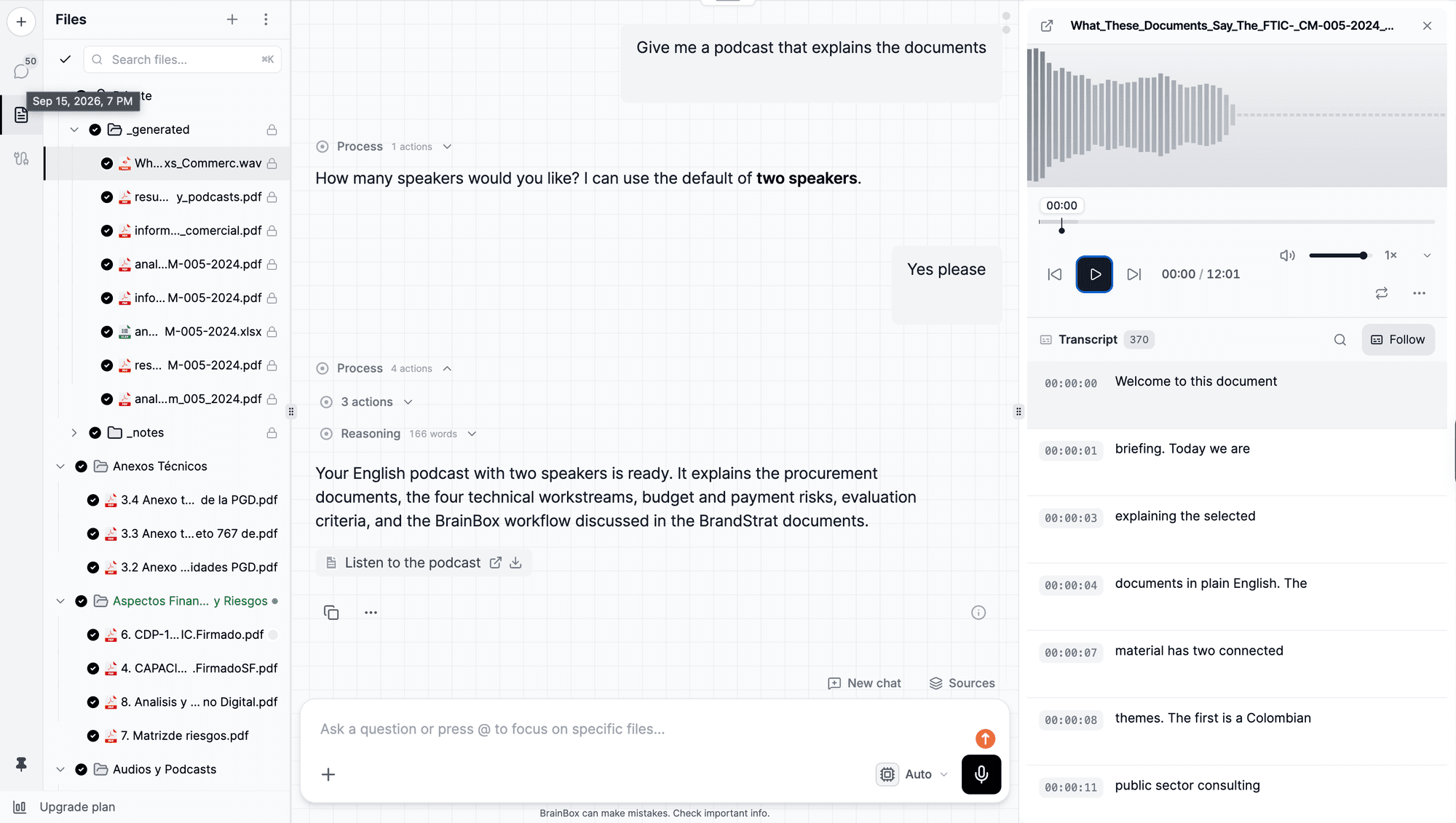
The WAV shows up in your Private folder under _generated. It opens in the player with the synchronized transcript; you can move it to a shared folder in the Box so your team can listen.
What does asking from the chat look like?
If you prefer the chat to the panel, the assistant asks the two necessary questions and generates. It goes like this:
I want a podcast from the three papers in the Systematic review folder.
How many speakers would you like? I can use the default of two speakers.
Yes please, two, medium length.
Done. I generated a 9-minute episode with two voices that walks through the three papers: each study's design, the results that agree, and the disagreement between the second and third on effect size.
Systematic review: three studies, one disagreement podcast-systematic-review.wav· 09:04
It is saved in Private/_generated and already indexed, so you can ask me about any part of the episode.
Once indexed, the podcast behaves like any audio file in the Box. Asking "at what minute do they discuss the disagreement?" returns the segment with its timestamp, just as with a recorded meeting.
This is where the three studies stop agreeing. The second reports a large effect and the third, with a bigger sample, almost none.
And is that explained by the design or by the population?
By the population, according to the third study's own authors: they included patients the other two excluded.
What options and limits does the generator have?
| Aspect | Detail |
|---|---|
| Sources | Any indexed file in the Box: PDF, Word, PowerPoint, Excel, audio or video transcripts, notes |
| Speakers | 1 to 30; 30 distinct voices available |
| Languages | English (US), English (UK), Spanish, French, German, Portuguese (Brazil), Italian |
| Length | Short (2 to 3 min), medium (7 to 10 min), long (15 to 20+ min) |
| Instructions | Free text to focus topics, names, tone or audience |
| Script | Up to 150 segments and 50,000 characters per episode |
| Output format | WAV, saved in the Box (by default in Private/_generated) |
| After generating | Transcribed and indexed: citable and queryable like any audio |
| Cost | Intelligence units, roughly 1 per minute of audio |
What is a podcast of your own documents good for?
For studying, it is a way to review a topic without a screen: a long episode on a course's notes covers the whole material, and study guides can be turned into audio the same way.
For tenders and contracts, a short episode on the bid documents gets the whole team to the kickoff meeting with the same context; the mandatory requirements still need reading, but the conversation beforehand makes it faster.
For teams, a podcast of the monthly report in the shared folder is an alternative to the email nobody opens.
How is it different from NotebookLM?
NotebookLM also generates a two-voice audio summary from uploaded sources, and does it well. The practical differences are in control and in what happens afterwards.
| NotebookLM (Audio Overview) | BrainBox | |
|---|---|---|
| Voices | Two-host conversation | 1 to 30 speakers, 30 voices, 7 languages |
| Where it lives | Inside the notebook | As a file in the Box, next to the sources, with the Box's permissions |
| After generating | You listen | Transcribed and indexed: cited by the minute and queryable like any audio |
| Sources | The notebook's | Any file in the Box, including meeting transcripts and your own notes |
The point that weighs most in professional work is the last row: the podcast stays as one more source in the project, with the same citations and permissions as the rest.
A long episode on five documents costs around 20 intelligence units and fits in a 20-minute commute.
Frequently asked questions
- Which languages can the podcast be generated in?
- Seven: US English, UK English, Spanish, French, German, Brazilian Portuguese and Italian. The podcast language does not have to match the documents: you can upload papers in English and ask for the episode in Spanish.
- How many voices can it have?
- From 1 to 30 speakers. There are 30 different voices available and each speaker gets a distinct one. For most cases, 2 voices (one explaining, one asking) works best.
- How long is a generated podcast?
- You pick one of three lengths: short (2 to 3 minutes), medium (7 to 10 minutes) and long (15 to 20 minutes or more). Long covers every topic in the material; short keeps the essentials.
- Is the podcast really based on my documents, or does the model make things up?
- The script is written from passages of the files you selected, each labeled with its source, with an instruction to cover several documents rather than one. Because the audio is transcribed and indexed when it finishes, you can ask the podcast what it said and check it against the original PDFs in the same Box.
- Where is the audio saved?
- As a WAV file inside the Box, by default in your Private folder under _generated. From there you can play it, download it, move it to a shared folder or delete it.
- How much does generating a podcast cost?
- It is charged in intelligence units for speech synthesis plus transcription and indexing of the result, roughly 1 unit per minute of generated audio. A medium 8-minute episode costs around 8 units.
Written by
BrainBox Team
Document intelligence, by ExaByte Company
We build BrainBox — the platform teams use to ask questions across their own documents and get answers with exact page citations.
Keep reading
How to turn a meeting recording into minutes with AI
Upload the audio or video, wait for a speaker-separated transcript, and ask for the minutes. Every decision links back to the exact second it was said, so nobody argues later about what was agreed.
Claude Haiku 5.5 in BrainBox: benchmarks, pricing and when to use it
Anthropic released Claude Haiku 5.5 on October 7, 2026 and it is already selectable in the BrainBox Assistant: one of the top scores in its price range on Artificial Analysis, with benchmarks, intelligence units per task and when to pick it over GPT-6 Luna.
Claude Opus 5.5 in BrainBox: benchmarks, pricing and when to use it
Anthropic released Claude Opus 5.5 on September 22, 2026 and it is already selectable in the BrainBox Assistant: the top spot on the Artificial Analysis Intelligence Index, with benchmarks, intelligence units per task and when it is worth it.