- audio
- meetings
- transcription
How to turn a meeting recording into minutes with AI
Upload the audio or video, wait for a speaker-separated transcript, and ask for the minutes. Every decision links back to the exact second it was said, so nobody argues later about what was agreed.
Useful minutes are a list of decisions and owners where every item can be checked against the recording. With an AI tool that transcribes by speaker and keeps the timestamp of every sentence, the minutes come out of a couple of questions, and any doubt is settled by listening to ten seconds of audio instead of the whole hour.
What does an AI tool need to get minutes right?
Three things, and all three have to happen before the model writes a single line.
The first is a transcript with speakers separated. Without diarization, "we agreed to cut the budget" does not say who proposed it or who accepted, and that is exactly the part people argue about afterwards.
The second is that every sentence keeps its start and end time. A flat transcript pasted into a chat loses that: the model can summarize, but nobody can go back to the exact moment to check.
The third is that the model answers only from what is in the transcript. If the system hands the model an unstructured text file, or the audio is longer than its context window, the model fills the gaps with what "usually happens in a meeting". That is where minutes with decisions nobody made come from.
BrainBox is an AI workspace for documents that answers with citations to the exact page. For audio and video, the "page" is the second: every transcript segment is indexed with its speaker and timestamp, and answers cite that point.
How do you get the minutes, step by step?
Upload the recording to the meeting's or project's Box
Drag in the MP3, MP4, M4A, WAV or MOV. The file shows as Pending while it transcribes and switches to Indexed once you can ask about it. No need to convert or trim it: the limit is 2 GB and 10 hours per file.
Open the file and check the transcript
The player shows the transcript with the speaker and time of every line. With Follow transcript on, the active line scrolls with the audio. Use it to confirm the audio quality produced a clean transcript before asking for anything.
Tell the AI who each speaker is
Diarization labels people as Speaker A, Speaker B and so on. A message like "Speaker A is Laura (management), Speaker B is Andrew (finance)" is enough for the minutes to use names.
Ask for the minutes with a concrete structure
The more specific the request, the easier the minutes are to check. For example: "Minutes with: attendees, decisions made, owners and dates, open items. Cite the moment of each decision."
Verify decisions by clicking the citations
Every decision comes with a citation that opens the player at that second. If a line is attributed to the wrong person or the model over-summarized, you see it in ten seconds of audio.
Save the minutes in the Box or export them
You can ask the AI to write the minutes as a file inside the Box, export the chat to PDF, Markdown or HTML, or copy a time reference to paste into an email.
What do minutes with audio citations look like?
This is how BrainBox answers a request for minutes on a 48-minute meeting. Every decision carries a citation number, and the Footnotes list under the message gives the file and the exact second.
Write the minutes: decisions, owner and date for each, and open items. Speaker A is Laura, Speaker B is Andrew.
Decisions
- Cut the marketing budget by 12% for Q4 only. Proposed by Laura, accepted by Andrew on the condition of a review in January.1
- Freeze new hires until the round closes. Owner: Andrew. Date: before September 30.2
Open items
- Laura asked for a six-month cash projection; no owner was assigned.3
Footnotes
- 1.steering-committee-2026-08-14.mp3- 00:14:02.000
- 2.steering-committee-2026-08-14.mp3- 00:21:47.000
- 3.steering-committee-2026-08-14.mp3- 00:33:15.000
Clicking a footnote opens the player at that point, and the transcript looks like this:
I propose cutting marketing by twelve percent, but only for the last quarter.
Agreed, on the condition that we review it in January with the closed numbers.
Fine, that's settled.
The claim "accepted by Andrew on the condition of a review in January" does not depend on anyone's memory: it is at minute 14:02.
What formats and limits does transcription have?
| Aspect | Detail |
|---|---|
| Audio formats | Over 30: MP3, WAV, M4A, M4B, AAC, FLAC, OGG, OPUS, WMA, AMR, AIFF, WebM and others |
| Video formats | Over 20: MP4, MOV, WebM, M4V, MTS, M2TS, MXF, FLV and others |
| Maximum file size | 2 GB |
| Maximum duration | 10 hours |
| Speakers | Automatic diarization (Speaker A, B, C...) |
| Language | Automatic detection |
| What is stored | JSON transcript and WebVTT captions next to the original file |
| Citations | Start and end timestamp of the segment; a click opens the player there |
| Clips | Up to 5 minutes, with a copyable time reference |
| Cost | Intelligence units based on minutes of audio |
What should you ask after the minutes?
Because the transcript stays indexed in the Box, the follow-up questions get answered with the same citations:
- "What did Andrew commit to in this meeting and in the one on August 7?" If both recordings are in the Box, the answer crosses the two with the minute from each.
- "When did we talk about vendor X?" Returns the segments with their timestamps, without you listening to anything.
- "Draft the follow-up email with the three decisions and their owners." It comes out ready to send, with the citations if you want to keep them.
If the recording is a hearing or an interview, the logic is the same. In a case file, the citation to the exact second is what lets you quote what was said without reconstructing it from memory.
How is this different from pasting the transcript into ChatGPT?
Pasting a transcript into a general chat works for a short meeting. It stops working when the meeting runs two hours, when there are several recordings for the same project, or when someone asks "where did they say that?".
| Pasting a transcript into a general chat | BrainBox | |
|---|---|---|
| Speakers | Only if your transcriber separated them | Automatic diarization on upload |
| Back to the audio | No link to the second | Every citation opens the player at that point |
| Long meetings | Input gets cut or summarized | Indexed by segment; 10 hours per file |
| Several meetings | One at a time | All of them in the Box, with the date on each citation |
| After the minutes | Lost when the chat closes | The transcript stays as a source in the Box |
NotebookLM also transcribes audio and lets you ask about it. The practical difference is in diarization, in the player with a synchronized transcript, and in the recording living next to the PDFs, emails and spreadsheets of the same project, so one question can cross the meeting with the contract that was discussed in it.
For compliance teams, the same recording works as evidence of what a committee agreed. For legal teams, it is the base for preparing the record of a hearing or a deposition without relying on handwritten notes.
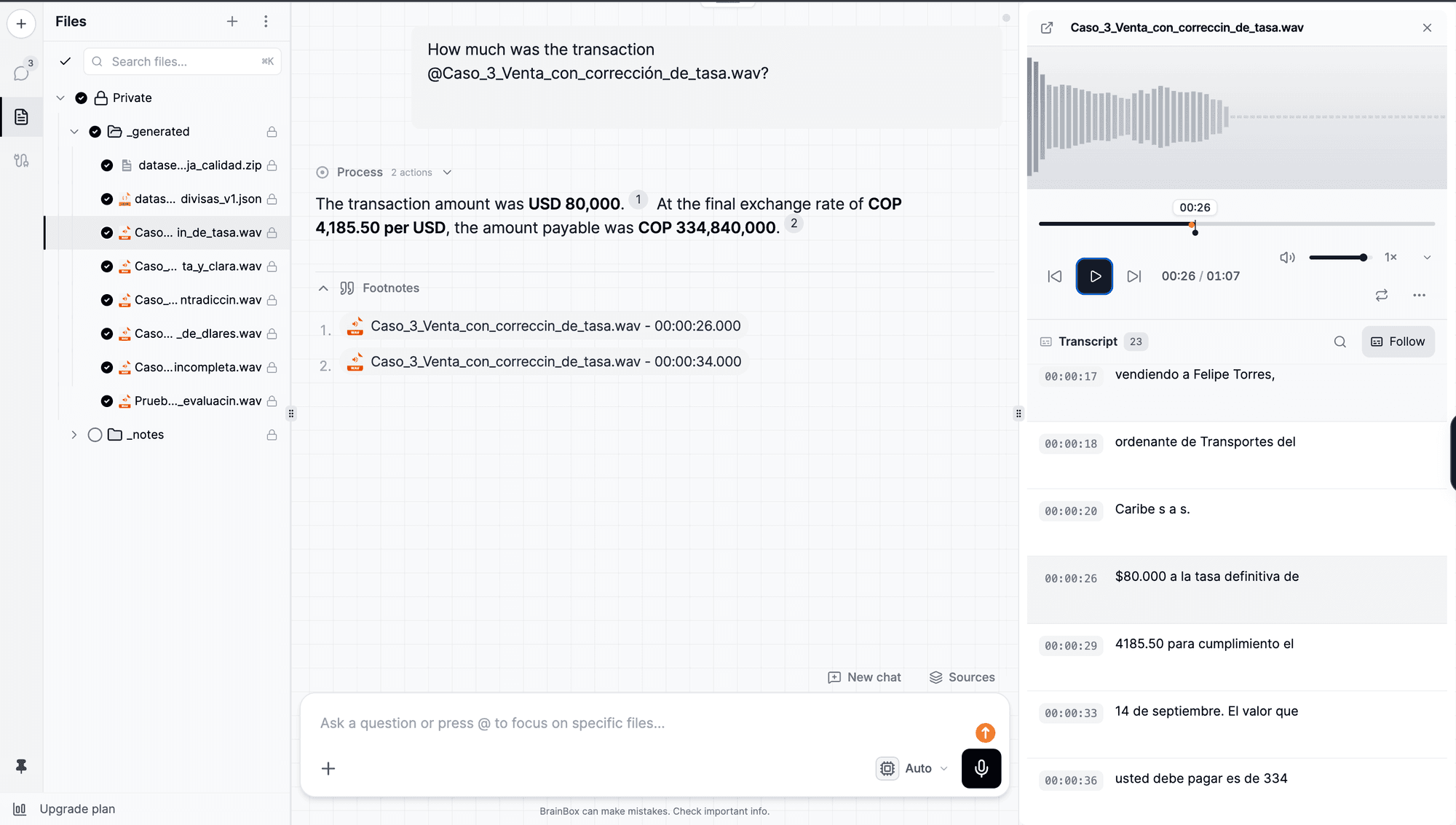
The practical limit is 10 hours and 2 GB per file; a full recorded workday fits in one file and can be queried whole.
Frequently asked questions
- Which audio and video formats can BrainBox transcribe?
- Over 30 audio formats (MP3, WAV, M4A, AAC, FLAC, OGG, OPUS, WMA, AMR and others) and over 20 video formats (MP4, MOV, WebM, M4V, MTS, M2TS, MXF, FLV and others). The limit is 2 GB per file and 10 hours of duration.
- Does the transcript tell speakers apart?
- Yes. The transcript includes speaker diarization: every segment carries a speaker label (Speaker A, Speaker B, ...) plus its start and end time. You can tell the AI who each speaker is in the chat and it will use the names in the minutes.
- Does it detect the meeting language automatically?
- Yes. Language detection is automatic, so you can upload meetings in English, Spanish or a mix without configuring anything.
- How long does a one-hour meeting take to transcribe?
- It depends on the processing queue, but usually a few minutes. The file shows as Pending while it transcribes and switches to Indexed once you can ask questions about it.
- How much does transcribing a meeting cost?
- It is charged in intelligence units based on the minutes of audio. Before you upload, the upload screen tells you whether your quota covers it.
- Can I share only the part where a decision was made?
- Yes. From the player you can copy a time reference or create a clip of up to 5 minutes with the exact passage and share it.
Written by
BrainBox Team
Document intelligence, by ExaByte Company
We build BrainBox — the platform teams use to ask questions across their own documents and get answers with exact page citations.
Keep reading
How to turn your PDFs into a podcast with AI
Select the documents, pick how many voices, which language and how long, and a few minutes later you have an episode that talks through your files. The audio is saved and transcribed, so you can ask it questions afterwards.
Claude Haiku 5.5 in BrainBox: benchmarks, pricing and when to use it
Anthropic released Claude Haiku 5.5 on October 7, 2026 and it is already selectable in the BrainBox Assistant: one of the top scores in its price range on Artificial Analysis, with benchmarks, intelligence units per task and when to pick it over GPT-6 Luna.
Claude Opus 5.5 in BrainBox: benchmarks, pricing and when to use it
Anthropic released Claude Opus 5.5 on September 22, 2026 and it is already selectable in the BrainBox Assistant: the top spot on the Artificial Analysis Intelligence Index, with benchmarks, intelligence units per task and when it is worth it.